


The Laptop That Became a Problem in Second Year
Why “Any Decent Laptop” Is Not a University Strategy
The pattern repeats every year. Students buy lightweight, affordable machines because university feels like writing essays and attending lectures. By Year 2, they are running AutoCAD for engineering modules, compiling Java for computing assignments, or processing large Excel financial models during business tutorials. The configuration that handled Year 1 barely manages Year 3, and correcting the mismatch mid-degree costs money.
The One Decision That Changes Everything: Faculty First, Brand Second
Brand and price are the wrong starting points. The most useful first filter is what software your faculty requires and whether it runs on the operating system you are considering. Identify your faculty, read its section below, then apply the five specification decisions to arrive at the right configuration at the right budget.
What Different Faculties at Singapore’s Three Universities Actually Require
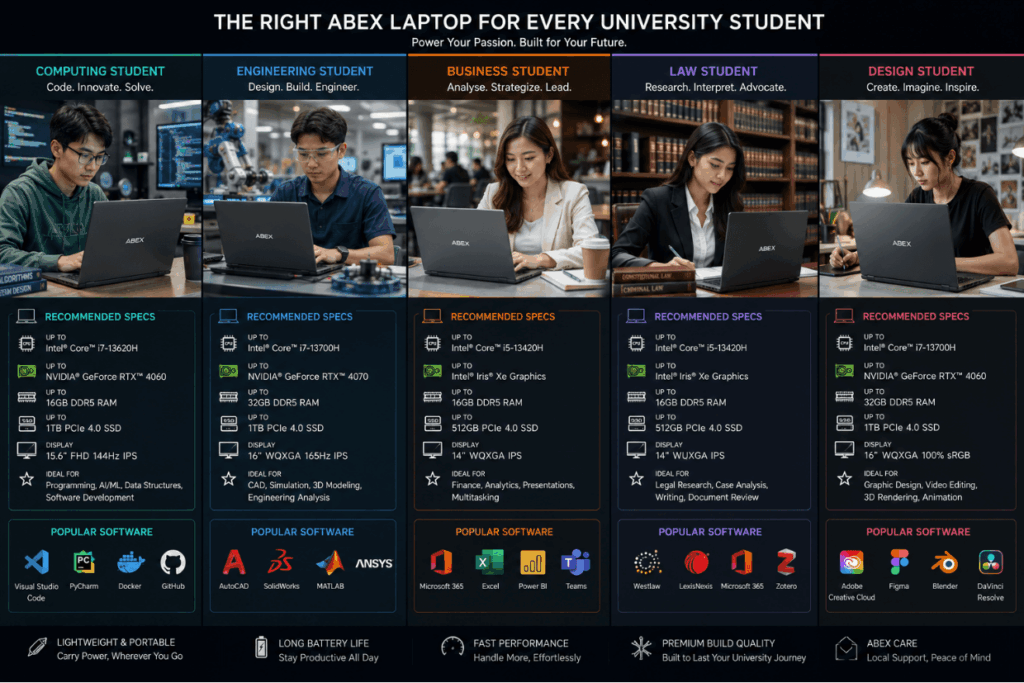
| Faculty | OS Requirement | Minimum RAM | Key Software | Estimated SGD Budget |
| Computing and Data Science | Windows preferred | 16GB | IDEs, virtual machines, Python | 1,200 to 1,800 |
| Engineering (CAD-heavy) | Windows required | 16GB | Civil 3D, ANSYS, MATLAB | 1,200 to 1,800 |
| Business, Accountancy, Finance | Windows or macOS | 16GB | Excel, PowerPoint, Python | 800 to 1,400 |
| Arts, Humanities, Law | Windows or macOS | 16GB | Word, LexisNexis, Zotero | 800 to 1,200 |
| Design, Architecture, Media | Windows or macOS | 32GB | Adobe CC, Rhino 3D, SketchUp | 1,800 and above |
Computing, Data Science, and Information Systems
Why Windows Often Matters More Than You Think
NUS School of Computing, NTU College of Computing and Data Science, and SMU School of Computing and Information Systems structure Year 1 and Year 2 modules around development environments and virtual machines that run more smoothly on Windows or Linux. WSL2 (Windows Subsystem for Linux 2, a compatibility layer that lets Windows run Linux tools) reduces some friction but is not a full substitute for running Windows natively.
What Performance Level Coding and Compilation Require
Target a current-generation processor (Intel Core Ultra 5 or AMD Ryzen 7 at minimum), 16GB RAM, and a fast NVMe SSD. Virtual machines run alongside code editors and browser tabs simultaneously; RAM headroom matters significantly here.
Engineering (Civil, Mechanical, Electrical, Chemical)
Which Engineering Disciplines Require Windows-Only Software
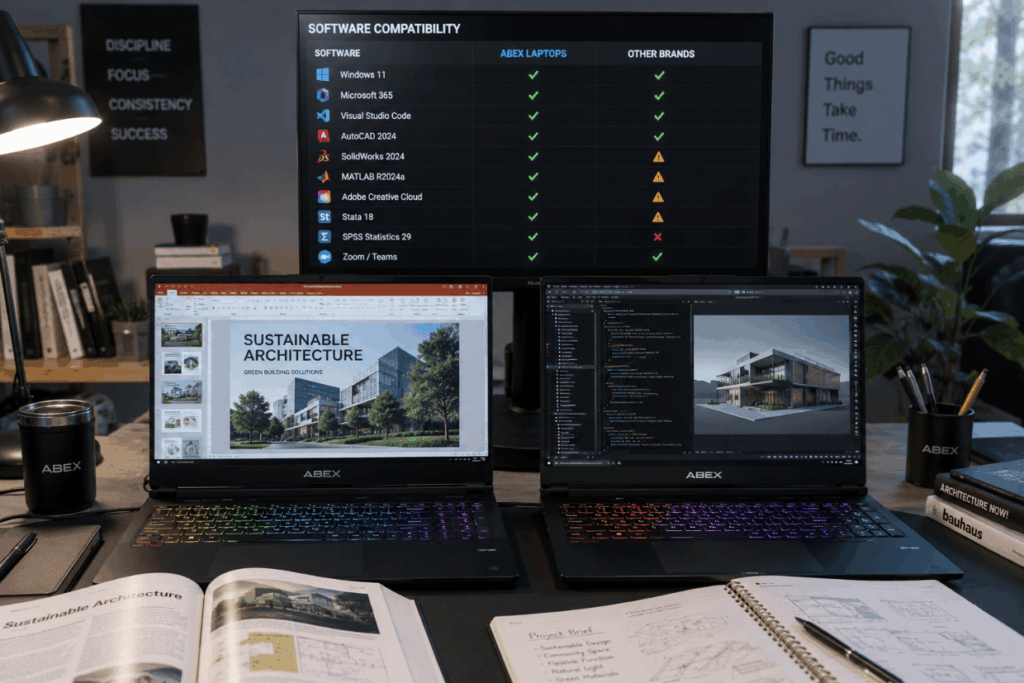
While AutoCAD has a macOS version, many engineering-specific tools used in NUS and NTU modules, including Civil 3D, Revit, ANSYS, and discipline-specific plug-ins, are Windows-only. The broader Autodesk and simulation ecosystem that engineering coursework relies on is far more complete on Windows. Buying a Mac for a CAD-heavy engineering course typically resolves one of two ways: Parallels virtualisation at added cost, or purchasing a second Windows device.
What Processor and RAM Level Simulation Needs
At minimum: 16GB RAM and a mid-range current-generation processor capable of handling geometry-heavy files without lag. A discrete GPU benefits 3D modelling modules. Electrical engineering students with Python-based or web-based simulation modules have more platform flexibility. Check your specific module software list before committing.
Business, Accountancy, and Finance
What Business Students Actually Run
The daily stack is Microsoft 365 (Excel, PowerPoint, Word), Zoom and Teams for group projects, browser-based Bloomberg for finance modules, and Python for quantitative finance electives. Running large Excel financial models on 8GB RAM produces noticeable lag during tutorials when time matters.
Why Business Students Have the Widest Platform Flexibility
Business students have genuine choice between macOS and Windows. The core software stack runs well on both. Once 16GB RAM is in place, battery life and weight become the primary decision factors. SMU’s presentation-heavy culture and NUS Business School’s workshop format both benefit from a machine that lasts a full day without a charger.
Arts, Social Sciences, Humanities, and Law
What FASS and Law Students Actually Need
The daily workflow is document-heavy: research sessions, LexisNexis and Westlaw database access, and extended writing in Word or Google Docs. Citation tools such as Zotero or Mendeley add minimal load. This is the least hardware-intensive faculty group, which shifts the decision almost entirely toward portability, display quality for long reading sessions, and battery life.
Why Portability and Battery Life Outweigh Performance Here
A law student’s day involves extended library sessions, tutorial rooms with limited power access, and seminars across multiple buildings. Once 16GB RAM is in place, portability and battery life should drive the rest of the decision.
Design, Architecture, and Communications
Why This Faculty Has the Most Demanding Requirements
Adobe Creative Cloud runs Photoshop, Illustrator, Premiere Pro, and After Effects simultaneously. Architecture students at NUS School of Design and Environment add SketchUp, Rhino 3D, and Enscape for rendering. Running multiple Adobe applications while referencing source files demands the highest hardware specification of any faculty group.
What Display, RAM, and GPU Capability Design Students Need
Display colour accuracy matters for design work in a way it does not elsewhere. A poor-colour display gives inaccurate feedback on design decisions. Design students need either a discrete GPU or Apple Silicon’s unified memory architecture, at least 32GB RAM for sustained production work, and a wide colour gamut display. 16GB is the absolute floor, but Year 2 and Year 3 workloads consistently push against it.
The Five Specification Decisions Every Singapore University Student Must Make

Decision 1: macOS or Windows
When Windows Is Required and Not Optional
Engineering students using Civil 3D, ANSYS, or MATLAB require Windows. Some computing modules with Windows-specific development environments have similar constraints. Boot Camp, which allowed Intel Macs to run Windows natively, is no longer available on Apple Silicon Macs. The only option on current Mac hardware is Parallels, a paid virtualisation tool that adds cost and runs Windows at reduced performance.
When macOS Works Well
Design students benefit from Apple Silicon’s unified memory architecture and Adobe CC’s native M-series performance. Business, arts, and law students find their entire software stack runs well on macOS. Trade-offs are a higher price at equivalent specification and less hardware flexibility for upgrades.
Decision 2: How Much RAM to Buy
Why 8GB Will Struggle by Year 2
Running six Chrome tabs, a Word document, an Excel file, a Zoom call, and a PDF reader simultaneously is normal during tutorial preparation. On 8GB, this creates perceptible lag. By Year 2, coursework introduces more demanding software and the problem compounds.
What 16GB Changes in Daily Use
16GB handles the realistic concurrent workload of most faculties comfortably. Computing students running virtual machines and design students running Adobe applications should target 32GB. Before purchasing, check whether the RAM is soldered to the motherboard or uses accessible SO-DIMM slots.
Decision 3: Battery Life vs Performance
What Real Campus Battery Life Means
Manufacturer battery claims are measured at low brightness with Wi-Fi off and minimal applications. Real-world campus use reduces those claims by 30 to 40 percent consistently. A device claiming 12 hours typically delivers 7 to 8 hours in practice.
The Singapore Campus Context
NUS’s hilly, spread-out campus and NTU’s large campus layout mean students travel between buildings throughout the day with limited access to power points. Six to seven hours of genuine mixed-use battery is the realistic minimum for NUS or NTU students. SMU’s compact Bras Basah campus gives SMU students slightly more flexibility on battery priority.
Decision 4: Weight and Portability vs Screen Size
What a Full Day on Campus Costs in Carrying Terms
Most students describe anything below approximately 1.5kg as light enough to stop thinking about. Above 2kg, it becomes a consideration every time they pack their bag. NUS and NTU’s campuses make this consequence more pronounced than at most overseas universities.
The 13-inch vs 14-inch vs 15-inch Trade-off
The 14-inch form factor has become the strongest balanced choice for most students across most faculties. It provides screen real estate for dual-window workflows and presentations while staying lighter than most 15-inch configurations. Design students benefit from 15 to 16 inch real estate. Arts and law students often prefer 13 to 14 inch for library portability.
Decision 5: Budget and Longevity
The Minimum Budget for Four Years of Useful Study Life
A device entering university in 2026 needs to remain capable through 2029 or 2030. Below approximately SGD 800, the hardware will be functionally end-of-life before graduation for most faculties. Buying cheaply with plans to upgrade mid-degree typically costs more in total than buying adequately at the start.
SGD 800 to 1,200 covers arts, law, and business needs. SGD 1,200 to 1,800 is the strongest range for computing and engineering. SGD 1,800 and above is where design and architecture students can meet their requirements without significant compromise.
macOS vs Windows: The Direct Comparison
Where macOS Has a Real Advantage
Design students using Adobe CC on Apple Silicon see genuine performance advantages. Arts and law students prioritising build quality and battery longevity find Apple Silicon MacBook configurations competitive. Business students whose stack is browser and Microsoft 365 based have genuine platform choice.
Where Windows Is the Only Practical Choice
Engineering students with Civil 3D, ANSYS, or MATLAB requirements cannot practically use macOS without costly workarounds. Computing students in modules with Windows-specific development environments face similar constraints. For these students, the OS decision is not a preference. It is a course requirement.
What Happens When You Get This Wrong
Buying a Mac for a Civil 3D-heavy engineering programme creates an immediate functional problem. Resolution options, Parallels or a second device, both carry cost. Verifying course software before purchasing eliminates this scenario entirely.
Gaming Laptops for University: When They Work and When They Do Not
The Faculties Where Dual-Use Makes Sense
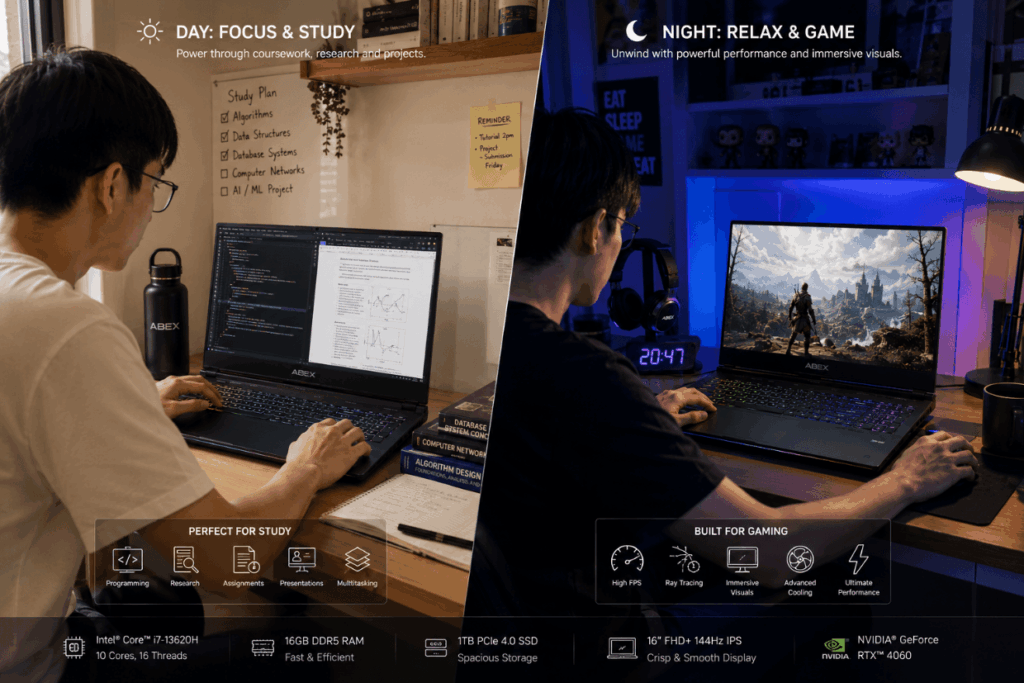
Computing students running virtual machines and design students handling rendering workloads find genuine overlap with gaming hardware. At SGD 1,500 to 2,000, a well-specified gaming machine can handle both coursework and gaming without meaningful compromise to either use case.
The Real Problems on a Singapore Campus
Most gaming machines weigh 2.1 to 2.6 kilograms. Real-world battery life under light campus use runs to three to five hours. On NUS or NTU campuses with long between-class gaps, this creates a daily logistics problem. A lighter, student-focused configuration avoids it entirely.
What a Genuine Dual-Purpose Configuration Looks Like
Look for an RTX 4060 at 100W TGP or above, 16GB dual-channel RAM, and a 144Hz IPS display. Chassis weight should sit below 2.2kg. Real-world battery life under light load should reach at least five hours. Finding all of these at SGD 1,500 to 2,000 requires careful specification comparison.
How to Make the Final Decision

The Four Questions to Answer Before Buying
Does my faculty’s core software require Windows? Is 16GB RAM sufficient or does my coursework demand 32GB? Is my primary constraint performance, portability, or battery life? Is my budget sufficient for four years of study?
Where to Verify Your Faculty’s Software Requirements
The only reliable source is your faculty’s own IT page, orientation materials, or student portal. NUS IT Services and NTU IT Services both publish recommended specifications reflecting actual course requirements. Check these before committing to any purchase.
How Abex Laptop Singapore Serves NUS, NTU, and SMU Students
Abex Laptop Singapore is one example of a Singapore-based laptop retailer whose student range spans the specification tiers relevant to different faculty requirements, from portability-first arts and business configurations to performance-first engineering and design options.
Conclusion
The right laptop for a Singapore university student is determined by faculty requirements before brand, price, or personal preference. Computing and engineering students at NUS and NTU need Windows in most disciplines, meaningful RAM, and processor capability. Business and arts students have genuine platform flexibility once 16GB RAM is in place, making battery life and weight the primary factors. Design and architecture students need the highest specification of any group, including display colour accuracy, GPU capability, and 32GB RAM. The five decisions every student must resolve are OS choice, RAM amount, battery versus performance priority, weight and screen size, and a budget adequate for four years. Verifying faculty-specific software requirements directly with the university’s IT pages before purchase is the single step that prevents an expensive mismatch.