


What Makes a Laptop Good for Work?
A good work laptop balances battery life, portability, and enough processing power to handle real multitasking, video calls, and file-heavy tasks without slowing down. For most Singapore-based professionals, that means a machine light enough for a daily commute, fast enough for spreadsheets and video meetings running side by side, and durable enough to survive two or three years of daily use.
That answer is the short version. The details below are where most buying decisions actually go wrong.
Why This Matters More in a Hybrid Setup
Singapore’s Tripartite Guidelines on Flexible Work Arrangement Requests took effect in December 2024, which means more employees now split their week between home, the office, and everywhere in between [ Tripartite Statement on Flexible Work Arrangements]. A laptop that only performs well when plugged into a desk is a poor fit for that reality. The features below are chosen specifically because they hold up across a commute, a coworking session, and a full day of video calls, not just in a spec sheet.
The 11 Features That Actually Matter
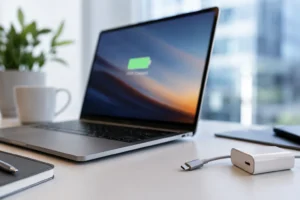
1. Battery Life That Survives a Full Workday
Look for at least 8 to 10 hours of realistic battery life, not the inflated figure on the box. If your day includes back-to-back video calls, expect actual runtime to drop by 20 to 30 per cent versus idle browsing.
2. Weight You Won’t Resent on the MRT
Singapore commuters spend an average of 84 minutes per day on public transport [Peak Hour Commuting, ConnexionSG]. A laptop under 1.5kg makes a real difference over a five-day week. Anything heavier tends to stay in the bag rather than come out.
3. A Display That Doesn’t Strain Your Eyes by 3 pm
Resolution matters less than most buyers assume. A sharp Full HD or QHD panel at a comfortable brightness beats a higher resolution screen that’s dim or glossy under office lighting. Singapore’s Workplace Safety and Health Council flags visual strain as a real, documented risk of poorly matched display setups, not just a comfort issue [ WSH Guidelines on Improving Ergonomics in the Workplace].
4. Enough RAM to Multitask Without Freezing
16GB is the realistic minimum for anyone running a browser with multiple tabs, a video call, and a document editor simultaneously. 8GB will technically run Windows 11, but it will visibly struggle the moment you open more than a handful of apps together.
5. Fast Storage, Not Just Large Storage
An NVMe SSD (even a 256GB one) will outperform a larger traditional hard drive in every practical sense: boot time, app load speed, file transfers. If your role involves large design files or datasets, prioritise at least 512 GB.
6. A Processor Matched to Your Actual Workload
Most office work (email, browsers, spreadsheets, video calls) runs comfortably on a mid-tier Ryzen 5 or Intel Core i5 class chip. Reserve the higher-tier Ryzen 7 or Core i7 options for heavier multitasking, light photo or video editing, or running multiple virtual machines.
7. USB-C Charging and a Real Port Selection
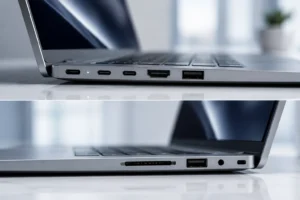
USB-C charging means you can share a charger with your phone or a portable power bank, which matters more than it sounds on a long commute. Beyond that, check for at least one full-size USB-A port and an HDMI output. If you regularly connect to an external monitor at a hot desk, this is not optional.
8. Wi-Fi 6 for Stable Video Calls
Older Wi-Fi standards struggle in crowded coworking spaces or busy home networks with multiple connected devices. Wi-Fi 6 handles that congestion far better, which shows up as fewer dropped video calls, not a number you’ll notice until it’s missing.
9. A Webcam and Microphone Setup You Won’t Need to Upgrade
Many work laptops still ship with a basic 720p webcam. That’s usable but noticeably softer than the 1080p cameras now common on mid-range models. If most of your workday involves video calls, this is worth checking before you buy rather than fixing with an external webcam afterwards.
10. A Build That Survives Being Carried Daily
An aluminium chassis resists dents and flexing far better than an all-plastic build, particularly around the hinge, which is the first part of a laptop to fail under daily commuting wear. This matters more than most buyers expect until their second year of ownership.
11. A Warranty Length That Matches How You’ll Actually Use It
A work laptop gets more daily wear than a home device. A 2-year premium warranty, rather than the more common 1-year standard, is a meaningfully better match for a machine you’ll be relying on five days a week.
Comparing Real Options Across These Features
No single laptop maximises all 11 features at every price point, which is exactly why the comparison matters more than any single spec. The table below lines up four current work-laptop options from ABEX across the features above, from budget-friendly to higher performance.
| Model | Best For | Display | Processor / RAM | Weight | Price (SGD) |
| ABEX ONYX 14N | Light admin work, email, browsers | 15.6″ FHD, 60Hz | Intel N95 / 12GB DDR5 | 1.6kg | 549–749 |
| ABEX Sapphire RZ14 | Daily commuters, ultralight priority | 14″ QHD | Ryzen 5 6600H / 16GB DDR5 | 1.0kg | 999–1,199 |
| ABEX Lumina AX59 | Balanced multitasking, video calls | 15.6″ FHD | Core i7-13620H / up to 32GB DDR4 | 1.7kg | 949–1,449 |
| ABEX Sapphire RZ16C | Heavier multitasking, larger screen work | 16″ QHD, 240Hz | Ryzen 7 8845HS / up to 64GB DDR5 | 1.8kg | 1,099–2,199 |
If portability is your top priority, the Sapphire RZ14’s 1.0kg weight stands out clearly against the rest of this list. If you regularly juggle multiple heavy applications or want RAM headroom for the next few years, the RZ16C’s 64GB ceiling gives the most runway. For most hybrid office roles between those two extremes, the AX59’s balance of screen size, processor, and RAM options tends to be the best fit.
Making the Final Call
Match your choice to your actual weekly pattern, not a worst-case scenario you’ll rarely hit. Someone who works from home four days a week and commutes into the office once should weigh portability far less than someone using the MRT daily. Someone whose work is mostly spreadsheets and email doesn’t need the same processor as someone editing video or running design software.
The 11 features above are not equally important for every buyer. Battery life and weight matter most for daily commuters. RAM and processor matter most for heavy multitaskers. Display quality and webcam performance matter most for anyone spending several hours a day in video calls. Start from how your week actually looks, then use the table above to find the closest match, rather than chasing the highest spec across the board.
For more background on why ABEX laptops are built around Singapore’s hybrid work patterns specifically, see [ Why Abex Laptops Are Good for You].
FAQ
How much RAM do I need for a work laptop in Singapore?
16GB is the realistic minimum for multitasking between a browser, video calls, and document editing without slowdown. 8GB will run Windows 11 but struggles once several applications are open together.
Is a lighter laptop worth paying more for?
If you commute daily, yes. Singapore commuters spend close to 84 minutes a day on public transport on average, and laptops under 1.5kg are far more likely to actually get used on the go rather than left in a bag.
Do I need a dedicated graphics card for office work?
No. Integrated graphics (like Intel UHD or AMD Radeon integrated chips) handle spreadsheets, browsers, video calls, and most office software without issue. A dedicated GPU only matters for video editing, 3D work, or gaming.